

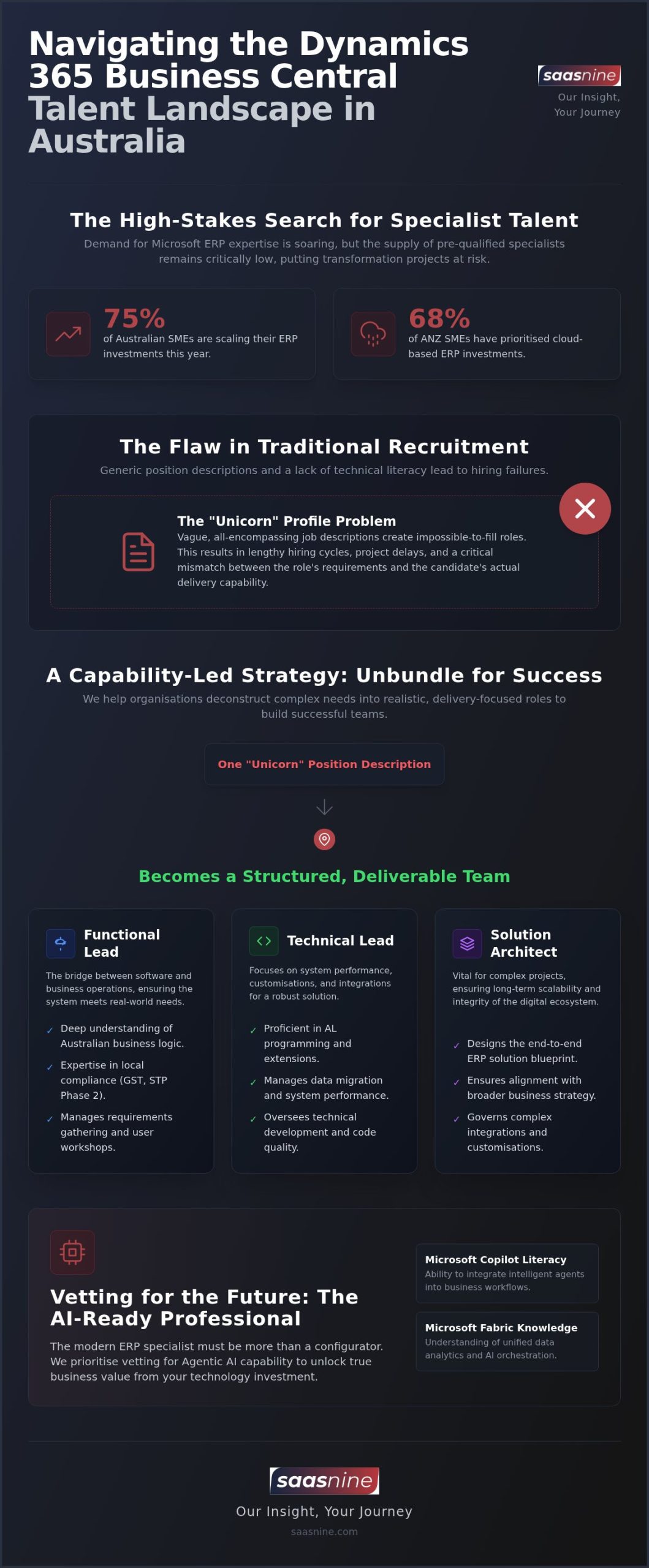
If 75% of Australian SMEs are scaling their ERP investments this year, why does the search to hire Dynamics 365 Business Central consultant talent still feel like a high-stakes gamble? You’ve likely felt the friction of a market where demand for Version 28.x expertise far outstrips the supply of pre-qualified specialists. It’s a frustrating reality that traditional recruiters often fail to grasp the technical nuances of the Microsoft stack, leaving your digital transformation strategy at risk of stalling before it even begins.
At saas nine, we believe the path to success lies in moving beyond basic headhunting toward a capability-led workforce strategy. This guide provides the strategic roadmap you need to navigate the 2026 talent landscape with confidence. You’ll learn how to secure specialists who don’t just fill a seat but align perfectly with your long-term objectives. We’ll explore current A$ salary benchmarks, the shift toward unbundling roles for better delivery, and how our vetted talent portal reduces hiring risk. Our Insight, Your Journey.
Key Takeaways
- Understand the 2026 Australian market pressures and why securing AI-ready ERP talent requires a shift from traditional recruitment to a strategic workforce capability model.
- Learn why generic position descriptions often lead to project delays and how unbundling these into realistic roles helps you hire Dynamics 365 Business Central consultant specialists who actually fit your delivery needs.
- Identify the critical vetting criteria for Business Central professionals, focusing on real-world experience in Australian digital transformations rather than just technical certifications.
- Discover how the saas nine Agentic Workforce Platform streamlines capability discovery, ensuring your technology strategy and workforce capability are perfectly aligned for your digital journey.
Navigating the 2026 Business Central Talent Landscape in Australia
Securing the right talent in 2026 isn’t a simple administrative task; it’s a strategic capability exercise. Australian businesses are currently facing dual pressures: the urgent need for legacy modernisation and the skyrocketing demand for AI-ready ERP specialists. Implementing Microsoft Dynamics 365 Business Central requires more than just technical configuration. It demands a deep understanding of how intelligent agents and Copilot features integrate with local business logic. This shift is driven by a market where 68% of ANZ SMEs have prioritised cloud-based ERP investments this year.
Traditional “CV-flicking” agencies often fail because they lack the technical literacy required to help you hire Dynamics 365 Business Central consultant specialists who can actually deliver. They see a job description; we see a roadmap. At saas nine, we operate under the framework of Our Insight, Your Journey. This approach ensures your workforce planning aligns with the specific complexities of the Australian market, moving beyond surface-level resumes to find genuine delivery capability.
The Shift from Generalist to Specialised Capability
Leading organisations have moved away from generalist IT recruiters. They now seek niche Microsoft ecosystem advisors who understand the nuances of the local landscape. Onshore expertise is vital for navigating Australian compliance, GST requirements, and Single Touch Payroll (STP) Phase 2 standards. Without this specialised knowledge, your implementation risks non-compliance or significant rework. We focus on connecting business strategy with technology capability to avoid these pitfalls.
Market Insights: What Drives ERP Talent in 2026?
The Australian talent pool has fundamentally changed. Hybrid work is now the non-negotiable standard for top-tier professionals. To successfully hire Dynamics 365 Business Central consultant talent, you must balance your permanent and contract mix. While permanent staff provide long-term stability, contractors offer the high-velocity skills needed for rapid ERP transformation. This strategic blend ensures your project delivery remains consistent and resilient against market volatility.
Beyond the Position Description: Unbundling Business Central Roles
Generic position descriptions are a frequent catalyst for hiring failures and project delays. They often create “unicorn” profiles that are impossible to fill in the competitive Australian market. Our philosophy at saas nine focuses on unbundling these descriptions into realistic, delivery-focused roles. This methodical approach allows you to hire Dynamics 365 Business Central consultant specialists who bring deep, specific expertise to your transformation journey rather than a shallow understanding of many areas.
Successful delivery teams are built on three core pillars: Functional Leads, Technical Leads, and Solution Architects. We recommend reviewing our detailed Dynamics 365 ERP role definitions to determine which mix of capability best suits your current project phase. Identifying these specific needs early prevents the common mistake of over-hiring for general skills while missing critical technical gaps.
Functional vs. Technical: Finding the Right Balance
Functional consultants act as the bridge between software and business. They must understand Australian regulatory requirements, such as STP Phase 2 and local tax laws, to ensure the system supports daily operations. Technical leads, meanwhile, focus on AL programming and system performance. For projects with significant bespoke customisations or complex integrations, a Solution Architect is vital to ensure the long-term scalability and system integrity of your digital ecosystem.
The Role of the AI-Ready ERP Professional
The skill set required for Business Central professionals is shifting toward AI orchestration. Specialists must now be literate in Copilot and Microsoft Fabric to unlock true business value. While industry initiatives work to solve technology skills shortage gaps, we prioritise vetting for Agentic AI capability right now. When you hire Dynamics 365 Business Central consultant talent through saas nine, we ensure they are equipped for this modern, automated landscape.
If you’re ready to define your team structure, contact our advisory team for a capability map and strategic workforce plan.
Vetting for Capability: A Technical and Functional Framework
A rigorous vetting process is the only reliable way to mitigate the high risk of project failure. While Microsoft certifications provide a baseline, they don’t guarantee that a professional can navigate the complexities of a live Australian implementation. To effectively hire Dynamics 365 Business Central consultant talent, you must look for proven real-world delivery capability. We focus on securing pre-qualified and vetted Microsoft professionals who have successfully managed digital transformations within the local market. By adopting a structured Building a Vetting Framework for Microsoft Professionals, you can significantly reduce hiring risk and ensure workforce capability matches your technical requirements.
Technical Benchmarks for Business Central
Assess technical leads by diving into their approach to AL code quality, API integrations, and Azure DevOps pipelines. Ask how they handle event-based customisations to keep the core system “clean” for future upgrades. Clean code in Business Central extensions refers to AL development that prioritises readability, maintainability, and modularity to ensure seamless future updates. This technical rigour is essential for maintaining system stability as Microsoft releases bi-annual updates.
Functional Competency and Business Logic
Functional consultants must do more than configure modules. They need to map system features to specific Australian requirements, including GST, BAS reporting, and complex supply chain logic. When you hire Dynamics 365 Business Central consultant specialists, evaluate their stakeholder management skills. ERP success depends on a consultant’s ability to translate technical possibilities into business value for C-suite executives and end-users. Soft skills are often the deciding factor in whether an implementation is embraced or resisted.
If you need to verify the technical depth of your current candidate pool, request a specialist vetting consultation to ensure your team is delivery-ready.
Partnering for Transformation: The saas nine Approach
Choosing a partner for your ERP journey requires a shift from transactional hiring to a strategic talent advisory model. At saas nine, we utilise our proprietary Agentic Workforce Platform to facilitate rapid capability discovery and faster mobilisation. This ensures that when you hire Dynamics 365 Business Central consultant specialists, you aren’t just filling a vacancy; you’re securing a professional whose skills are mapped directly to your digital transformation roadmap. We connect your overarching business strategy with technical workforce capability, ensuring every placement contributes to long-term success.
Our transition to a Talent Portal model provides Australian organisations with unprecedented visibility. Unlike traditional recruiters who guard their candidate lists, we offer a transparent environment where pre-qualified specialists are easily accessible. This approach improves engagement and ensures that your technology heads can review vetted capability in real-time. Accessing this visibility is crucial for leaders who need to hire Dynamics 365 Business Central consultant talent quickly to meet project milestones.
Strategic Advisory and Workforce Planning
We help organisations design their delivery teams by identifying current gaps and planning for future needs. Our Microsoft Ecosystem Capability Map serves as a strategic tool to align workforce design with your specific business goals. By unbundling roles and defining precise technical requirements, we ensure your team is structured for peak performance and scalability.
Engagement Models for Australian Organisations
Every transformation project has unique demands. We offer flexible models including contingent recruitment for immediate needs, executive search for leadership roles, and talent augmentation for scaling existing teams. Whether you need a permanent hire or a high-impact contractor, our focus remains on delivery capability. Our Insight, Your Journey starts with defining the right capability via saas nine.
Securing Your Path to ERP Success
Navigating the complex Australian talent market in 2026 requires more than just filling seats; it demands a strategic alignment between your technology roadmap and workforce capability. By unbundling generic roles and applying a rigorous vetting framework, you ensure that every specialist contributes directly to your project’s success. The transition from traditional hiring to a capability-led strategy is the most reliable way to reduce project risk and unlock the full potential of Microsoft’s latest AI-driven innovations.
At saas nine, we empower your digital transformation through our proprietary Agentic Workforce Platform and specialist Microsoft ecosystem capability mapping. Whether you need strategic workforce planning advisory or are ready to hire Dynamics 365 Business Central consultant specialists, we provide the steady hand you need in a competitive environment. Our team is committed to delivering pre-qualified talent that fits your specific delivery requirements. Contact saas nine to secure pre-qualified Business Central talent and take the next step in your digital evolution. Our Insight, Your Journey.
Frequently Asked Questions
What is the average lead time for hiring a Business Central consultant in Australia?
In 2026, the lead time for a pre-qualified Business Central consultant typically ranges from three to six weeks, depending on the complexity of the required technical stack. At saas nine, our Agentic Workforce Platform accelerates this process by providing immediate visibility into a pre-vetted talent pool. This allows Australian organisations to mobilise projects faster while significantly reducing the risk associated with traditional hiring workflows, helping you hire Dynamics 365 Business Central consultant talent with confidence.
How does saas nine vet technical specialists for Business Central roles?
Our vetting process is multi-layered, focusing on technical mastery and functional alignment. We assess technical leads on AL code quality, API integration expertise, and Azure DevOps proficiency. Functional consultants are evaluated on their ability to map Business Central features to specific Australian business requirements, including tax and payroll compliance. This rigorous pre-qualification ensures every professional on our platform is ready to deliver immediate value, providing a bridge between your strategy and workforce capability.
Should I hire a permanent employee or a contractor for my Business Central rollout?
The choice depends on your long-term roadmap. For a core implementation or major upgrade, contract specialists offer immediate, high-impact capability. However, for ongoing optimisation and internal capability uplift, permanent placements are often more strategic. saas nine provides advisory on the ideal workforce mix, supporting both permanent recruitment and contract augmentation. This ensures your delivery team’s structured for sustained success, allowing you to scale your Microsoft ecosystem expertise as your business journey evolves.
What is the difference between a Business Central Functional Consultant and a Technical Lead?
A Functional Consultant bridges the gap between business processes and software, ensuring the system meets Australian regulatory and operational needs. A Technical Lead focuses on the underlying architecture, customisations, and AL programming. At saas nine, we specialise in unbundling these roles to ensure you have the right balance of business logic and technical excellence. This targeted approach helps you hire Dynamics 365 Business Central consultant specialists who align perfectly with your digital transformation strategy.
How does the saas nine Talent Portal improve the recruitment process?
The saas nine Talent Portal replaces traditional, manual recruitment workflows with AI-driven capability discovery. It provides Australian organisations with real-time visibility into a pre-qualified talent pool, improving candidate matching and reducing hiring risk. By automating administrative tasks and focusing on strategic capability, the portal ensures a more efficient, transparent, and successful engagement for both hiring managers and technology professionals. It’s a modern way to connect business strategy with workforce capability.