
What if the biggest risk in a SharePoint hire is defining the wrong role? Organisations looking to hire sharepoint developer australia-wide can easily bundle SharePoint administration, SPFx development and broader Microsoft 365 responsibilities into one position. The right capability depends on the outcome: modernising a legacy solution, building a custom web part or connecting SharePoint with other business tools.
It’s also important to distinguish React experience from experience that fits your SharePoint environment. SPFx 1.24 introduces official support for React 18, but that doesn’t make every React developer an immediate fit for an SPFx project. This guide explains where SPFx and React 18 belong, how to define a realistic role around business needs, and which capabilities to assess. You’ll also learn when permanent hiring, contract support and Talent Augmentation can suit different delivery requirements. saas nine helps organisations connect technology plans with the capability needed to deliver them, combining role-design advice with Microsoft market intelligence.
Key Takeaways
- Before you hire sharepoint developer australia-wide, define the business outcome and map the work to the capability required.
- Assess SharePoint platform knowledge, SPFx experience and React skills as related but distinct capabilities.
- Use a four-step role-design process to set priorities, and separate responsibilities when one position combines too many disciplines.
- Choose permanent hiring for ongoing capability, or contract and Talent Augmentation for defined requirements and specialist support.
Hiring a SharePoint Developer in Australia: Start with the Business Outcome
A SharePoint developer builds or extends solutions within a Microsoft SharePoint environment to address a defined business need. The role might focus on improving an intranet, connecting SharePoint with another system, refining a workflow or creating a tailored user experience. Define the outcome first, then identify the technical capability needed to deliver it.
That distinction helps prevent an overpacked position description. Routine platform use, such as managing existing content, may not require a developer. Custom functionality or integrations often do. A useful overview of SharePoint can help frame the platform’s range of uses, but your hiring brief should focus on what your organisation needs to change or deliver. If you’re looking to hire sharepoint developer australia-wide, describe the business problem in plain language, then identify the work that requires specialist development.
Hiring a developer is also different from engaging an outsourced software development service. The hire adds capability to your organisation’s delivery model, whether as a permanent employee or a contract specialist working with your team. Define who owns priorities, decisions and ongoing support so the role fits the way your organisation delivers change.
When does a SharePoint project need a developer?
Bring in development capability when the desired result goes beyond routine configuration or platform use. An intranet improvement might need a tailored interface; a workflow project may require custom functionality; an extension could connect SharePoint with another business system. Specify the user need and expected result first. That gives candidates a clearer scope than a broad request to “improve SharePoint”.
Where do SPFx and React 18 fit?
The SharePoint Framework (SPFx) is a development approach for building customisations within SharePoint. React 18 may be relevant when the project’s front end and codebase use it, but it isn’t a universal requirement for every SharePoint role. Separate essential SharePoint platform knowledge from SPFx delivery experience and React capability. This helps you avoid excluding suitable candidates or requiring skills the project won’t use.
SPFx and React 18 Skills: Match the Developer to Your SharePoint Environment
A strong role brief separates three related capabilities: SharePoint platform knowledge, SharePoint Framework (SPFx) experience and front-end development with React. They can overlap in one person, but they aren’t interchangeable. Someone who understands SharePoint administration may not have built SPFx components, while a React developer may need specific experience working within your SharePoint environment.
Microsoft’s SharePoint Framework (SPFx) Overview explains SPFx’s role in extending SharePoint. Use it to ground the technical scope, then describe the work candidates will actually do. The framework requirement should follow the project environment, not a generic job-description template.
Which capabilities belong in the role brief?
Start with deliverables. A role building custom SPFx components may need hands-on framework experience; a user-facing interface may call for React; an integration may require knowledge of the systems and interfaces involved. List essential skills separately from adjacent knowledge, such as broader Microsoft 365 or Power Platform familiarity. Include those broader capabilities only when they support the role’s responsibilities.
How should employers treat React 18 compatibility?
SPFx version 1.24 introduces official support for React 18, but that isn’t a blanket compatibility promise for every SharePoint solution. Existing code, dependencies, tooling and the organisation’s environment all matter. Before making React 18 a mandatory hiring criterion, have the technical lead validate the project’s SPFx and React versions against current Microsoft documentation. Then specify the relevant experience in the brief.
If you need to hire sharepoint developer australia-wide, this distinction helps keep requirements realistic: prioritise the skills needed for delivery and avoid screening out capable candidates for a version your project doesn’t use. saas nine’s Microsoft talent sourcing can help shape hiring needs around the capability your environment requires.
How to Define and Assess a SharePoint Developer Role
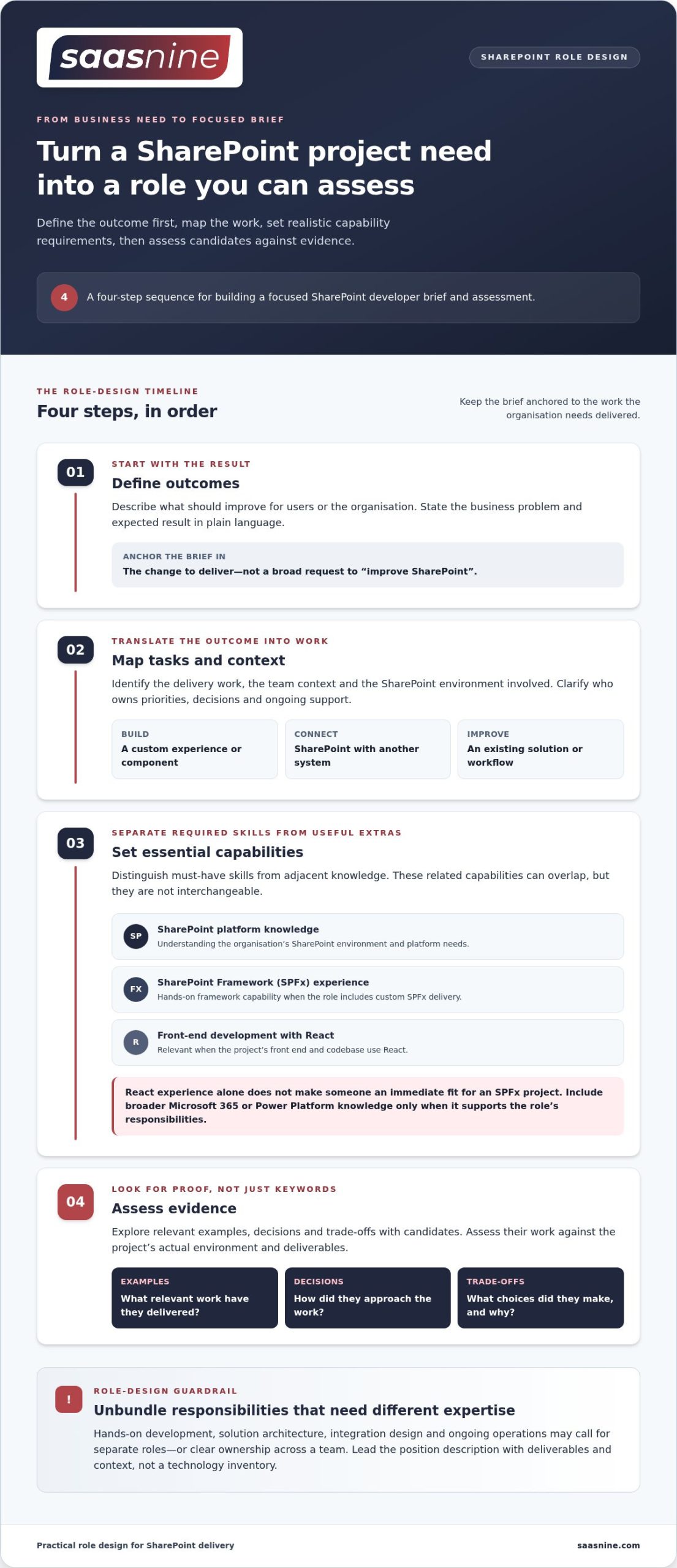
A clear assessment starts before interviews. Use this sequence to turn a project need into a focused brief, then assess candidates against evidence of their work rather than a list of framework names.
- Define outcomes: Describe what should improve for users or the organisation.
- Map tasks: Identify the delivery work, team context and SharePoint environment involved.
- Set essential capabilities: Distinguish must-have skills from adjacent knowledge.
- Assess evidence: Explore relevant examples, decisions and trade-offs with candidates.
Turn project needs into a realistic position description
Lead with deliverables and context, not a technology inventory. Explain whether the role will build a custom experience, integrate systems or improve an existing solution, and how it will work with the organisation’s technical team. Then unbundle responsibilities that require materially different expertise or seniority. Hands-on development, solution architecture, integration design and ongoing operations may call for separate roles or clear ownership across a team.
A simple capability matrix can help hiring stakeholders agree on what the role must deliver, what can be shared across the team and what belongs in a separate position. This keeps the brief anchored to the work and gives interviewers a consistent basis for assessing candidates.
Assess technical depth without over-specifying the brief
Use scenarios based on the actual work. Ask how a candidate would approach a component change, assess an integration constraint or balance user needs with the existing environment. Invite them to explain their contribution, the options they considered and why they chose a particular path. React’s React 18 Official Release can help interviewers frame questions about the version, but naming a framework alone isn’t proof of delivery capability. Look for relevant hands-on examples, and assess architecture or stakeholder leadership separately when those are part of the role.
To shape a realistic brief and assess Microsoft capability, talk with saas nine about your hiring needs.
Choose a Hiring Model That Fits the SharePoint Work
The right hiring model depends on the capability you need, how long you need it and where the work sits within your delivery team. A permanent role can build ongoing SharePoint knowledge and continuity. A contract specialist may suit a defined project, a time-bound requirement or a particular capability gap.
Permanent, contract or Talent Augmentation?
Consider the purpose of the work before choosing a model. Permanent hiring can support a continuing pipeline of SharePoint improvements and provide a consistent owner for platform development. Contract hiring can add specialist capability for a scoped piece of work or a temporary delivery need. Talent Augmentation provides an individual specialist or project team to work within your delivery structure. Your organisation retains ownership of the work and delivery direction.
Align the decision with your workforce plan. Consider whether the capability will remain valuable beyond the current project, whether the work has a defined end point and how the specialist will work with internal teams. saas nine uses Microsoft market intelligence to inform capability discovery and candidate matching, supported by its Talent Portal.
Connect SharePoint hiring to broader Microsoft capability
Some SharePoint work intersects with Microsoft 365, Power Platform or other Microsoft technologies. Include adjacent skills when the role’s deliverables genuinely require them, such as collaborating on a workflow that involves Power Automate. Don’t add every related technology by default. Doing so can obscure the core SharePoint capability and make the role harder to define.
saas nine connects workforce needs with Microsoft capability through its Microsoft technology recruitment services. Its Talent Portal supports candidate matching and visibility, while keeping role requirements anchored to the work your organisation needs delivered.
For a considered next step, discuss your SharePoint talent needs with saas nine and shape a hiring model that fits your capability plan.
Make Your Next SharePoint Hire a Strategic Step
A SharePoint hire can do more than address an immediate project need. Define how the capability will support your organisation’s wider technology priorities, and consider what knowledge your team will need to retain as the work evolves. That perspective can help you choose a role and engagement model that makes sense beyond the first deliverable.
For organisations ready to hire sharepoint developer australia-wide, saas nine connects workforce planning with access to pre-qualified and vetted Microsoft professionals. Permanent, contract and Talent Augmentation models offer different ways to align specialist capability with your delivery needs.
Bring your business priorities, current SharePoint environment and capability gaps into the conversation. Discuss your SharePoint hiring needs with saas nine and take a considered next step towards building the right capability for your organisation.
Frequently Asked Questions
Does every SharePoint developer need React 18 experience?
No. React 18 experience is relevant when the project uses it in its SPFx solution or front-end codebase. For an upgrade, assess whether the candidate has handled compatibility testing, dependencies and changes in rendering behaviour, not just used React in another context. If your SharePoint work doesn’t involve React, making it a required skill could narrow the field without improving the hiring decision.
What is the difference between a SharePoint developer and an SPFx developer?
A SharePoint developer is a broad role covering development within the SharePoint environment, while an SPFx developer specifically builds solutions using the SharePoint Framework. An SPFx specialist may focus on custom web parts or extensions; a broader SharePoint developer role may also involve other development approaches or platform responsibilities. Compare candidates against the solution you need built, rather than relying on job titles alone.
Can a SharePoint developer work on a contract basis in Australia?
Yes. Contract hiring can suit a defined project, a temporary capability gap or a specialist requirement that doesn’t call for a permanent role. For example, an organisation modernising an intranet might engage a contractor for a scoped delivery phase, while its internal team retains product decisions and ongoing ownership. Employers seeking to hire sharepoint developer australia-wide can consider contract recruitment alongside permanent and Talent Augmentation options.
What should an employer include in a SharePoint developer job description?
Describe the purpose of the role, expected deliverables, reporting or team context, and the SharePoint environment involved. Specify the development work and relevant tools only where they’re needed for delivery. Clarify whether the person will build, maintain or support solutions, and state how success will be judged. Keep desirable skills separate from essential requirements so candidates can see what the role genuinely demands.
How can an organisation assess a SharePoint developer’s technical capability?
Ask candidates to explain a relevant solution they’ve delivered, their specific contribution and the trade-offs they considered. A scenario based on your environment can reveal how they clarify requirements, handle constraints and communicate technical decisions. Where practical, review a code sample or technical walkthrough that doesn’t expose confidential information. Assess hands-on development separately from architecture or stakeholder leadership, since each calls for different evidence.